Online security has become more important than ever. People use online accounts every day to access email, social media, banking services, shopping websites, cloud storage, and other digital platforms. While passwords help protect these accounts, they are not always enough to keep personal information safe.
Passwords can be stolen through phishing attacks, exposed in data breaches, guessed by attackers, or reused across multiple websites. If someone obtains your password, they may be able to access your account without your permission.
This is where two-factor authentication (2FA) becomes useful.
Two-factor authentication adds an extra layer of security by requiring you to verify your identity using a second method in addition to your password. Even if someone discovers your password, they may still be unable to access your account without the additional verification.
But what exactly is two-factor authentication, how does it work, and which method should you use?
In this guide, we will explain everything you need to know about two-factor authentication, including its benefits, different types, setup process, common mistakes, and practical tips for protecting your online accounts.
What Is Two-Factor Authentication?
Two-factor authentication is a security method that requires two different types of evidence to verify your identity before allowing access to an account or service.
It is commonly abbreviated as 2FA.
Traditional login systems often require only a username and password. Although passwords can be effective, they become a security risk if they are stolen, guessed, or reused.
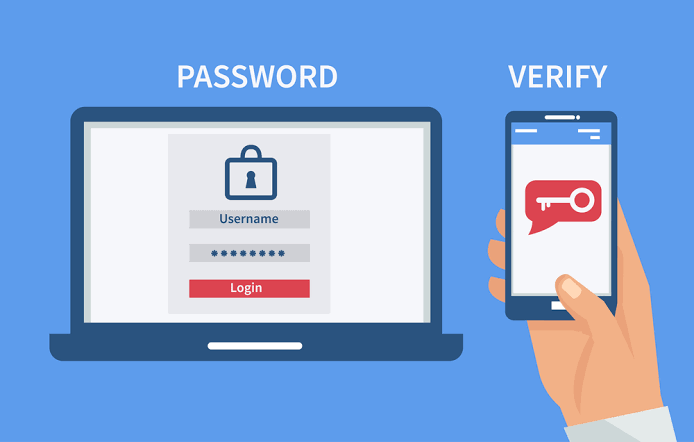
With 2FA enabled, logging in generally requires your password plus another verification method, such as a code from an authentication app, a security key, or a confirmation through another trusted device.
For example, imagine that you log in to your email account using your password. The service then asks you to enter a temporary code generated by an authentication app.
Even if another person knows your password, they would generally need access to the additional authentication method to complete the login.
This makes unauthorized access more difficult.
Two-factor authentication is widely used by email providers, banks, social media platforms, cloud services, and business applications.
How Does Two-Factor Authentication Work?
Two-factor authentication works by combining two different authentication factors.
These factors usually belong to three categories:
- Something you know: A password, PIN, or other secret.
- Something you have: A smartphone, security key, or authentication device.
- Something you are: A biometric characteristic, such as a fingerprint or facial feature.
For example, a password combined with a code from an authentication app uses something you know and something you have.
Here is how a typical 2FA login works:
- You enter your username and password.
- The service verifies your login credentials.
- The service requests a second form of authentication.
- You approve the login, enter a temporary code, or use a security key.
- The service verifies the second factor and grants access if everything is valid.
The exact process depends on the platform and the authentication method.
Some services request a second factor every time you sign in, while others may remember a trusted device for a period of time. Additional verification may be required when you use a new device, change security settings, or sign in from an unusual location.
The key idea is that your password is no longer the only thing protecting your account.
What Is the Difference Between Two-Factor Authentication and Multi-Factor Authentication?
Two-factor authentication and multi-factor authentication are closely related, but they are not identical.
Two-factor authentication requires exactly two authentication factors.
Multi-factor authentication (MFA) is the broader term for a system that requires two or more distinct authentication factors.
For example:
- A password plus an authentication-app code is 2FA.
- A password plus a security key is 2FA.
- A password, security key, and an additional biometric verification may form an MFA process if the system requires all three distinct factors.
Not every extra login step counts as a separate authentication factor. For example, entering a password twice does not provide two different factors.
Both 2FA and MFA can improve security, but the protection they offer depends on the strength of the methods used.
Types of Two-Factor Authentication
Not all authentication methods provide the same level of security or convenience. Understanding the main options can help you choose the right method for your accounts.
1. SMS Verification Codes
SMS-based authentication sends a temporary verification code to your registered mobile phone number.
After entering your password, you receive a text message containing a code that you must enter to complete the login.
Advantages:
- Easy to understand and use.
- Does not require a separate authentication app.
- Available on many websites and services.
Disadvantages:
- Vulnerable to certain phone-number takeover attacks, including SIM swapping.
- May not work reliably when you have no cellular service.
- Messages can be exposed through compromised devices or accounts.
SMS verification is generally better than relying on a password alone, but stronger options are preferable when available.
2. Authentication Apps
Authentication apps generate temporary verification codes on your smartphone.
Examples include Google Authenticator, Microsoft Authenticator, and other compatible authentication applications.
Many of these apps generate codes using a shared secret and the current time, so the codes can work without an internet connection.
Advantages:
- Generally more resistant to SIM-swapping attacks than SMS codes.
- Often works without mobile data or Wi-Fi.
- Can support multiple online accounts in one application.
Disadvantages:
- Losing your phone can complicate account recovery if you have no backup method.
- You must protect the app and its backup arrangements.
- Some phishing attacks can still trick users into entering valid codes on fraudulent websites.
For many users, an authentication app is a practical and relatively secure option.
3. Push Notifications
Some services send an authentication request to a trusted device when someone attempts to sign in.
You may receive a notification asking whether you approve the login.
Depending on the service, the request may include number matching, which asks you to select or enter a number displayed on the login screen.
Advantages:
- Convenient because you may not need to type a code.
- Can make suspicious login attempts easier to notice.
- Number matching can reduce the risk of accidentally approving a fraudulent request.
Disadvantages:
- Repeated requests can pressure users into approving an attack.
- Approving a request without checking it can allow unauthorized access.
- Push authentication depends on the service and device being configured correctly.
Never approve a sign-in request that you did not initiate.
4. Security Keys
Security keys are physical devices used to verify your identity when signing in to supported accounts.
They may connect through USB, NFC, or another supported interface. Many use standards such as FIDO2 or WebAuthn.
Security keys can provide strong protection against phishing because they are designed to verify the legitimate website or service involved in the authentication process.
Advantages:
- Strong protection against many common phishing attacks.
- Does not rely on receiving SMS messages.
- Can be used across multiple compatible services.
Disadvantages:
- You need to obtain and keep the key secure.
- You may need a compatible connector or interface.
- Losing your only key can complicate account access.
For people who manage sensitive accounts or face elevated security risks, security keys can be an excellent option. Keeping a properly registered backup key in a safe location can help prevent lockouts.
5. Passkeys and Biometric Authentication
Passkeys use cryptographic credentials to authenticate you without requiring you to enter a traditional password.
They can be unlocked using a device PIN, fingerprint, facial recognition, or another supported method.
Although passkeys are often discussed alongside two-factor authentication, they are not simply a password plus a second factor. They are a different authentication approach designed to replace passwords and resist phishing.
A passkey can combine possession of a registered device or credential with local user verification.
Advantages:
- Resistant to many traditional phishing attacks.
- No password needs to be typed into a potentially fraudulent website.
- Convenient on supported devices and services.
Disadvantages:
- Availability and recovery options vary by service.
- Users need to understand how their passkeys are synchronized or backed up.
- Account recovery may become difficult if all registered devices and recovery methods are lost.
Passkeys are worth considering whenever a trusted service supports them.
6. Email Verification Codes
Some services send a temporary login code or sign-in link to your email address.
This can provide an additional step, but its strength depends heavily on the security of the email account receiving the code.
If an attacker already controls your email account, email-based verification may offer little additional protection.
Use a strong password and strong authentication on your primary email account because it often serves as the recovery channel for many other services.
Why Is Two-Factor Authentication Important?
Two-factor authentication provides several important security benefits.
1. It Adds Protection When Passwords Are Stolen
Passwords can be exposed through phishing, data breaches, malware, or accidental disclosure.
If you reuse the same password across several websites, a breach at one service may put your other accounts at risk.
With 2FA enabled, an attacker who obtains your password may still need a second authentication factor to sign in.
This does not make an account impossible to compromise, but it creates an additional barrier.
2. It Helps Protect Personal Information
Online accounts often contain sensitive information, including private conversations, photographs, contact details, documents, and purchase histories.
An email account may also contain password-reset messages and access to other services.
Protecting these accounts with 2FA can make it harder for unauthorized people to access your personal information.
3. It Improves Email Security
Email is particularly important because it is often used to reset passwords for other accounts.
If someone gains access to your email, they may be able to attempt password resets for social media accounts, shopping services, and other platforms.
Enabling strong authentication on your primary email account can therefore help protect several parts of your digital life.
4. It Helps Reduce the Risk of Account Takeovers
Account takeovers occur when unauthorized people gain control of legitimate accounts.
Attackers may use stolen passwords to access social media profiles, online stores, gaming accounts, or business systems.
A second authentication factor can make these attacks more difficult, particularly when the method is resistant to phishing.
5. It Provides an Extra Layer for Financial Accounts
Financial services may use additional verification to protect sensitive actions, such as signing in, transferring money, or changing account details.
When available, enable the strongest authentication methods supported by your bank or financial provider.
Always use the bank’s official website or application to manage security settings, and never disclose verification codes to someone who contacts you unexpectedly.
6. It Can Help Businesses Protect Their Systems
Businesses use 2FA to reduce the risk of unauthorized access to company email, internal applications, cloud platforms, and administrative accounts.
This is particularly important for accounts with access to customer information, financial records, or critical systems.
Organizations can strengthen protection further by requiring phishing-resistant authentication for administrators and other high-risk users.
What Happens If You Do Not Use Two-Factor Authentication?
Without 2FA or another strong additional authentication method, an account may depend primarily on the security of its password.
If an attacker obtains a valid password, the service may allow access without requiring further proof of identity.
The consequences can include:
- Unauthorized access to private messages and personal files.
- Misuse of social media accounts.
- Fraudulent purchases or other financial activity.
- Password-reset attacks against connected services.
- Exposure of business information or customer data.
- Loss of access to an account.
The level of risk varies depending on the service, password quality, available security controls, and the information stored in the account.
Using a unique, strong password is essential, but adding 2FA can provide another layer of defense.
How to Enable Two-Factor Authentication on Your Accounts
The setup process varies between websites and applications, but the general steps are similar.
Step 1: Open Your Account Security Settings
Sign in to the service through its official website or application.
Look for a section called Security, Account Security, Sign-in & Security, or Two-Step Verification.
Step 2: Find the Authentication Options
The service may offer several methods, such as SMS codes, authentication apps, push notifications, security keys, or passkeys.
Choose the strongest practical option supported by the service.
When available, a passkey or phishing-resistant security key is often preferable to SMS verification. An authentication app is also a useful choice for many users.
Step 3: Follow the Setup Instructions
If you select an authentication app, the service may display a QR code that you scan using the app.
The app then generates a verification code that you enter to confirm the setup.
For a security key, follow the instructions to register the physical device. For push notifications, approve the setup request only when you initiated it.
Step 4: Save Your Recovery Codes
Many services provide backup or recovery codes when you enable 2FA.
Store these codes in a secure location, such as a trusted password manager or another protected place recommended by the service.
Do not post them online, send them to strangers, or store them where someone with access to your email can easily find them.
Step 5: Configure a Backup Method
If supported, register a backup security key or another secure recovery method.
This can help you regain access if your phone is lost, damaged, or replaced.
Avoid relying on a single authentication device without understanding the recovery process.
Step 6: Test Your Setup
Sign out when convenient and test the login process.
Confirm that your second factor works and that you understand how to recover access if you lose your primary device.
Once everything is working, keep your authentication methods and recovery information up to date.
Which Accounts Should You Protect With 2FA First?
If you have not enabled two-factor authentication before, start with the accounts that could cause the greatest problems if someone gained access.
Prioritize the following:
- Primary email account: It may be used to reset passwords for other services.
- Banking and financial accounts: Protect access to money and sensitive financial information.
- Apple Account or Google Account: These may connect to backups, devices, photographs, and other personal services.
- Password manager: It may contain credentials for many of your other accounts.
- Social media accounts: These can be used for impersonation, scams, and unauthorized messages.
- Work and business accounts: These may provide access to company systems and confidential information.
- Shopping and payment accounts: These may contain saved addresses, payment information, or purchase histories.
The exact priority depends on your circumstances, but securing your email account is a particularly useful starting point.
Common Two-Factor Authentication Mistakes to Avoid
Two-factor authentication is most useful when configured carefully. Avoid these common mistakes.
Using Weak Authentication When Better Options Are Available
SMS verification is generally better than password-only access, but it is vulnerable to certain attacks.
For sensitive accounts, consider an authentication app, passkey, or security key if the service supports it.
Approving Unexpected Login Requests
Attackers may repeatedly send authentication requests in the hope that you will approve one out of frustration or confusion.
Never approve a sign-in notification unless you initiated the login and have verified that the request is legitimate.
If unexpected requests continue, change your password from a trusted device and review your account activity.
Sharing Verification Codes
Legitimate support staff should not ask you to disclose your one-time login code over an unsolicited call or message.
Scammers may impersonate banks, technical support teams, employers, or friends to obtain these codes.
Treat authentication codes like passwords and never share them with another person.
Ignoring Recovery Options
If you lose your phone and have no backup authentication method, you may have difficulty accessing your account.
Set up recovery options during the initial configuration rather than waiting until an emergency.
Storing Backup Codes Insecurely
Recovery codes can provide access when your normal authentication method is unavailable. Anyone who obtains valid codes may be able to misuse them.
Keep them protected and replace them if you believe they have been exposed.
Reusing Passwords Across Websites
Two-factor authentication does not eliminate the risk associated with weak or reused passwords.
Use a unique password for every important account. A reputable password manager can help you create and store strong credentials.
Assuming 2FA Prevents Every Attack
Two-factor authentication greatly improves security, but it cannot prevent every form of account compromise.
Attackers may still exploit malware, stolen login sessions, compromised devices, social engineering, or weaknesses in account recovery systems.
Combine 2FA with software updates, strong passwords, careful browsing, and regular account-security reviews.
Is Two-Factor Authentication Completely Secure?
No security method is perfect, and two-factor authentication is no exception.
Its effectiveness depends on the method used and the threats you face.
For example, SMS codes can be vulnerable to SIM swapping. Authentication-app codes can be stolen through real-time phishing. Push notifications can be abused through repeated approval requests.
Security keys and passkeys provide stronger protection against many phishing attacks because they use cryptographic methods that can verify the legitimate website or service.
However, even strong authentication cannot eliminate every risk, particularly when an attacker compromises a device, steals an authenticated session, or takes advantage of weak recovery procedures.
For most people, enabling 2FA remains a major improvement over relying on a password alone.
For higher-risk accounts, choose phishing-resistant authentication whenever possible and protect the devices and accounts used to recover access.
Frequently Asked Questions
Is two-factor authentication free?
Many websites and applications offer 2FA at no additional cost. However, requirements vary by provider, and some services may charge for particular business or security features.
Can I use two-factor authentication without a phone?
Yes. Depending on the service, you may be able to use a hardware security key, a compatible computer-based authenticator, or another supported authentication method.
What happens if I lose my phone?
You may still be able to sign in using backup codes, a registered security key, another trusted device, or the service’s account-recovery process. Set up recovery options in advance to reduce the risk of being locked out.
Is SMS two-factor authentication safe?
SMS verification is generally better than using only a password. However, it is more vulnerable to certain attacks than phishing-resistant methods such as security keys and passkeys. Use a stronger option when one is available and practical.
What is the difference between 2FA and a one-time password?
A one-time password is a temporary code used for authentication. It can serve as the second factor in a 2FA system, but the terms are not interchangeable. Some one-time passwords are sent by SMS, while others are generated by authentication apps.
Should I enable 2FA on social media accounts?
Yes, especially if your accounts contain private messages, personal information, or a large audience. Strong authentication can make unauthorized access and account takeovers more difficult.
Does two-factor authentication prevent phishing?
It depends on the method. Some forms of 2FA can still be tricked through phishing, while security keys and passkeys are designed to resist many common phishing attacks. Always verify website addresses and avoid entering login codes on unfamiliar pages.
Is two-factor authentication better than a strong password?
They protect against different risks and work best together. A strong, unique password reduces the likelihood of password compromise, while 2FA adds another layer of verification. Neither should be treated as a complete substitute for the other.
Can hackers bypass two-factor authentication?
Some attacks can bypass or undermine certain implementations of 2FA, including phishing, stolen sessions, and account-recovery abuse. Using phishing-resistant authentication, securing your devices, and protecting recovery methods can reduce these risks.
Final Verdict: Why You Should Enable Two-Factor Authentication
Two-factor authentication is one of the most practical steps you can take to improve your online security.
Passwords remain important, but they can be exposed through phishing attacks, data breaches, and other security failures. Adding a second authentication factor makes it harder for someone to access your account using a stolen password alone.
For most users, an authentication app is a good starting point. If a service supports passkeys or hardware security keys, those options can provide stronger protection against phishing. SMS verification is still worth considering when stronger alternatives are unavailable.
Start by protecting your primary email account, financial services, password manager, and important personal accounts. Save your recovery codes securely, use unique passwords, and never approve login requests you did not initiate.
The bottom line: Two-factor authentication adds an important layer of protection to your digital life. It does not guarantee complete security, but combining it with strong passwords, phishing awareness, and regular security checks can significantly improve the protection of your online accounts.