The internet makes it easier than ever to connect with people, shop online, manage finances, and share information. However, every online account, public profile, and website registration can leave behind personal information that you may not want others to find.
Your name, phone number, email address, home address, photographs, and other personal details may appear in search results, social media profiles, public records, people-search websites, or data broker databases. In some cases, this information can remain online long after you have forgotten about the website where you originally shared it.
Having personal information publicly available can create privacy concerns. It may increase the risk of spam, phishing attempts, identity theft, unwanted contact, or harassment.
The good news is that you can take practical steps to reduce your online exposure. Although it is rarely possible to erase every trace of information from the internet, you can remove many public details, limit future data collection, and make it more difficult for strangers to find information about you.
In this guide, we will explain how to remove personal information from the internet, request removal from search engines, opt out of data broker websites, protect your social media accounts, and build better privacy habits for the future.
1. What Personal Information Is Available on the Internet?
Before you begin removing information, it helps to understand what may be publicly accessible.
Personal information can appear in many places, including search engines, social networks, public directories, old accounts, online forums, and commercial databases.
Common examples include:
- Full name and previous names.
- Home address and previous addresses.
- Personal phone numbers.
- Email addresses.
- Photographs and videos.
- Date of birth.
- Employment history and professional profiles.
- Family relationships and household information.
- Usernames associated with different websites.
- Public posts, comments, and forum discussions.
- Information collected by data brokers.
- Public records, depending on the jurisdiction and type of record.
Some of this information may have been shared by you. Other details may have been published by a business, another individual, a government agency, or a website that collects public records.
For example, you might discover that a people-search website displays your name, approximate age, previous addresses, and possible relatives.
You may also find old social media posts that reveal more about your personal life than you intended.
The first step is to identify where your information appears and determine who controls it.
2. Search for Your Personal Information Online
You cannot remove information effectively until you know where it is published.
Start by searching for yourself using several variations of your name.
Search Google and Other Search Engines
Open a search engine and search for your full name in quotation marks.
For example:
"Your Full Name""Your Full Name" phone number"Your Full Name" address"Your Full Name" email"Your Full Name" city"Your Full Name" employer
Replace the example text with your own information.
You can also search for old usernames, personal email addresses, and phone numbers. If you have used different names over the years, search those as well.
Try more than one search engine because their results may differ.
Search for Images of Yourself
Use image search to find publicly available photographs associated with your name.
You may discover old profile pictures, event photographs, personal blog images, or photographs posted by other people.
If you find an unwanted image, identify the website hosting the original file. Removing the image from the original website is usually more effective than simply asking a search engine to stop displaying it.
Check People-Search Websites
People-search websites collect and display information from various sources. Some may list addresses, phone numbers, relatives, approximate ages, and other personal details.
Search your name alongside terms such as:
- People search.
- Public records.
- Address lookup.
- Phone lookup.
- Background information.
You do not need to visit every website that appears in search results. Start with those displaying the most sensitive or widely accessible information.
Review Your Old Accounts
Think about websites where you previously created accounts, including:
- Social media platforms.
- Online shopping websites.
- Discussion forums.
- Gaming services.
- Dating platforms.
- Personal blogs.
- Old email services.
- Professional networking websites.
Some accounts may contain personal details even if you have not used them for years.
Create a simple list of the websites where you find unwanted information. Record the page URL, the type of information exposed, and whether you control the account.
This will help you prioritize removal requests.
3. Remove Personal Information From the Original Website
One of the most effective ways to remove information from the internet is to contact the website that publishes it.
Search engines generally display information that exists on other websites. Removing a search result does not necessarily delete the original content.
For example, if a people-search website publishes your phone number, removing the result from Google may not prevent someone from finding the number directly on that website.
Step 1: Find the Website Owner or Privacy Contact
Visit the website and look for pages titled:
- Privacy Policy.
- Contact Us.
- Data Removal.
- Opt Out.
- Privacy Request.
- Do Not Sell or Share My Personal Information.
Some websites have dedicated forms for requesting removal of personal information.
Step 2: Submit a Clear Removal Request
Explain which information you want removed and provide the exact page URL.
You generally do not need to write a long explanation. State that the information identifies you and that you are requesting its removal or restriction from public access.
If the website requires identity verification, provide only the information reasonably necessary for the request.
Avoid sending a full identity document or other highly sensitive information unless it is genuinely required and you have verified that the request is legitimate.
Step 3: Save Confirmation of Your Request
Keep a copy of your request, the date you submitted it, and any confirmation number or response.
If the website does not respond, check its published privacy policy for a follow-up process.
Some requests may take time to process, and certain websites may be legally permitted to retain specific information.
Step 4: Verify That the Information Has Been Removed
Return to the page after the website has processed your request.
Check whether the information has disappeared from the original source. If it has, you can then address outdated search engine results if necessary.
Important: Removing a page from public view does not always mean that every copy has been erased. Backups, archives, screenshots, and copies on other websites may remain.
4. Remove Your Information From Google Search
Google provides tools for requesting the removal of certain personal information from its search results.
This can be particularly helpful when search results display sensitive information, even if the original website has not yet removed it.
However, Google’s removal policies have limits. Removing a result from Google does not automatically delete the information from the website that published it.
Use Google’s Personal Information Removal Tools
Visit Google’s official content removal help pages and look for the options related to personal information.
Official resource: https://support.google.com/websearch/
Depending on the situation, you may be able to request removal of certain information, such as:
- Personal contact information.
- Home addresses.
- Phone numbers.
- Email addresses.
- Certain sensitive information that creates a significant risk.
- Content covered by Google’s other removal policies.
Eligibility depends on the content, circumstances, and applicable policy.
Use the Results About You Tool
Google offers a feature called Results about you in supported regions and accounts.
It can help you identify certain search results containing your personal contact information and, where supported, request their removal.
You can learn more here:
Availability and functionality may vary. Check Google’s current instructions to determine which options are available to you.
What If the Website Has Already Removed the Information?
Sometimes a website removes a page, but Google continues displaying an old result or cached information temporarily.
Google provides a tool for requesting an update to outdated search results when the original content has changed or disappeared.
Start from Google’s official removal help center and follow the instructions for outdated content.
Will Google Remove Everything About Me?
No. Search engines do not automatically remove every page that contains your name.
Some information may remain eligible to appear in search results, particularly if it is part of public-interest reporting, official records, or content that does not meet the applicable removal criteria.
Even when a search result is removed, the underlying webpage may still be accessible through its original URL or another search engine.
For the best results, combine search engine removal requests with removal requests to the original websites.
5. Remove Your Information From Data Broker Websites
Data brokers collect information from public records, commercial sources, websites, and other databases. They may use this information to build profiles that can be sold, licensed, or made available through people-search services.
Some brokers display details such as names, previous addresses, phone numbers, estimated ages, and possible family relationships.
Removing your information from these websites can be one of the most useful ways to reduce your public online footprint.
How to Opt Out
The process varies by website, but it generally follows these steps:
- Search for your name on the data broker’s website.
- Find the profile that matches you.
- Open its privacy, opt-out, or removal page.
- Follow the verification instructions.
- Submit the removal request.
- Save the confirmation and check the result later.
Some websites may ask you to verify your identity through an email address or other information.
Use caution when providing personal details. Verify that you are on the legitimate website before submitting a request.
Which Data Brokers Should You Check?
Begin with people-search services that appear prominently when you search for your name.
You can also search for phrases such as “people search opt out” or “personal information removal” to identify services publishing your information.
Prioritize websites that expose your home address, phone number, or other sensitive details.
Because data brokers may share information with other services, removing one profile does not guarantee that your information disappears everywhere.
Why You May Need to Repeat the Process
Data brokers may collect your information again from public records or other sources after an opt-out.
Some services may also have multiple databases or affiliated websites with separate removal procedures.
Review your exposure periodically and repeat opt-out requests when necessary.
If you live in a jurisdiction with applicable privacy rights, you may have additional options for requesting deletion, restricting processing, or opting out of certain data uses.
6. Make Your Social Media Accounts More Private
Social media accounts are a major source of publicly available personal information.
Even if you do not publish your home address directly, photographs, location tags, employment details, birthdays, and posts about your daily routine can reveal information about you.
Review your profiles on platforms such as Facebook, Instagram, TikTok, X, LinkedIn, and any other services you use.
Make Your Profiles Private
Where possible, limit who can see your posts, photographs, friend lists, and personal details.
A private account can reduce public exposure, although information shared with approved followers may still be copied or redistributed.
Remove Unnecessary Personal Details
Review your profile information and remove details that strangers do not need to know.
Consider hiding or deleting:
- Your phone number.
- Your home address.
- Your full birth date.
- Personal email addresses.
- Information about family members.
- Details about your daily routine.
- Unnecessary location information.
Keep in mind that some platforms may require limited information for account operation or identity verification.
Review Old Posts and Photographs
Older posts can reveal information you no longer want to share.
Look through old photographs, public comments, check-ins, and posts that mention where you live or work.
Delete or restrict content that exposes more personal information than you are comfortable sharing.
Check Tagged Content
Other people may tag you in photographs or posts that are visible publicly.
Review tagging settings and remove tags where the platform permits it. You may also ask the person who posted the content to remove it.
Removing a tag may not delete the original photograph, so contact the person who published it if necessary.
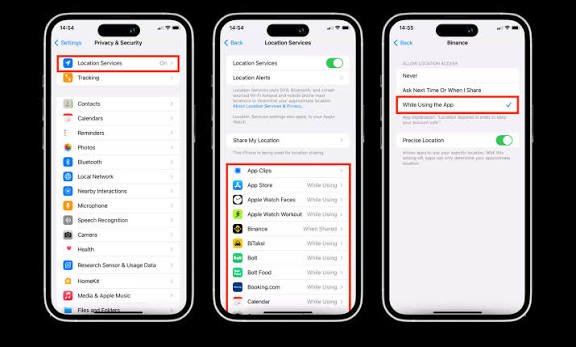
Disable Unnecessary Location Sharing
Turn off automatic location tagging if you do not need it.
Review permissions for social media applications and limit location access to what is necessary.
Avoid publishing real-time details about your home, travel plans, or daily movements when doing so could create a safety risk.
7. Delete Old Online Accounts You No Longer Use
Unused accounts can continue storing personal information long after you stop visiting the website.
These accounts may contain old messages, profile information, photographs, shipping addresses, or other personal details.
Deleting unnecessary accounts can reduce your digital footprint.
Find Your Old Accounts
Search your email inbox for terms such as:
- Welcome.
- Verify your email.
- Confirm your account.
- Password reset.
- Account created.
- Subscription confirmation.
These messages may help you identify websites where you previously registered.
You can also check your password manager for saved accounts.
Download Important Information First
Before deleting an account, determine whether you need to save photographs, documents, purchase records, or other information.
Some services permanently delete account data after a waiting period, while others may retain certain records for legal or operational reasons.
Delete the Account Properly
Look for account settings related to deletion or closure.
Deleting an application from your phone does not necessarily delete the account associated with it.
If a service does not offer a straightforward deletion option, consult its official privacy policy or contact its support team.
Remove Connected Applications
Review applications and websites connected to your Google Account, Apple Account, or other online accounts.
Revoke access for services you no longer use or recognize.
Remember that revoking third-party access does not necessarily delete information the service previously collected. You may need to contact that service separately.
8. Remove Personal Information From Public Records Where Possible
Some personal information comes from public records, including property records, business registrations, court documents, and other government databases.
The ability to remove this information depends on the type of record, the jurisdiction, and the law governing publication.
Identify the Original Record Source
If a website displays your address from a public record, determine whether the information originates from a government agency or a commercial data broker.
Removing a commercial copy may be easier than removing the original government record.
Check Whether Privacy Restrictions Are Available
Some jurisdictions provide special protections for certain people, such as eligible public officials, judges, law enforcement personnel, or individuals facing documented safety risks.
Certain records may also have procedures for sealing, redaction, or restricting access.
These options are not universally available and may require specific eligibility criteria.
Contact the Relevant Agency
Visit the official website of the agency responsible for the record.
Ask whether the record can be corrected, redacted, restricted, or removed under applicable rules.
If the information is accurate and legally required to remain public, complete removal may not be possible.
Understand the Limits of Public Records Removal
Even when a government agency changes a record, copies may remain on commercial websites or in previously downloaded documents.
You may need to request removal from those secondary sources separately.
9. Remove Your Personal Information From Websites You Do Not Control
Sometimes personal information appears on a website you cannot edit yourself.
This may include photographs posted by someone else, an online directory, a forum discussion, or a news article.
The appropriate approach depends on the content and the reason you want it removed.
Contact the Website Administrator
Find the site’s contact page or privacy contact.
Provide the exact URL, identify the information you want removed, and explain your request clearly.
If the content includes sensitive information, explain the specific privacy or safety concern without disclosing unnecessary additional details.
Contact the Person Who Published It
If the content was posted by another individual, you may be able to ask them to remove it.
For example, you could request that a friend remove a public photograph containing your home address in the background.
However, if contacting the person could create a safety risk, do not feel obligated to do so.
Report Content That Violates Platform Rules
If the content includes harassment, impersonation, non-consensual intimate imagery, threats, or exposed private information, use the platform’s official reporting process.
Some platforms provide specific procedures for sensitive personal information or abusive behavior.
The availability of removal depends on the content and the platform’s policies.
Understand That Not Every Page Can Be Removed
A website may refuse a request if the content is lawful and does not violate its policies or applicable privacy laws.
In such cases, you may still be able to reduce its visibility through search engine removal tools or pursue other options under local law.
10. Protect Your Email Address and Phone Number
Your email address and phone number are often used to identify you across multiple websites.
They may also serve as recovery methods for important accounts.
Reducing unnecessary exposure can help limit spam, unwanted contact, and certain types of targeted attacks.
Remove Them From Public Profiles
Review social media, personal websites, online directories, and professional profiles.
Remove personal contact information where it is not necessary for your intended use.
If you need a public contact method for work, consider using a separate professional email address.
Review Old Forum Posts
Search for your email address or phone number in quotation marks.
Older forum posts, advertisements, and classified listings may still display contact details you posted years ago.
If you find them, contact the website or delete the post if you still control the account.
Be Careful With Email Aliases
Email aliases can help separate services and reduce the amount of information shared with individual websites.
For example, you might use one address for shopping and another for personal communication.
Aliases do not erase information already published online, but they can make future exposure easier to manage.
Consider a Separate Public Phone Number
If you need to publish a number for business or other public activities, a dedicated business number may help keep your personal number private.
Choose a reputable service and understand its privacy and security policies.
11. Use Privacy Tools to Reduce Your Online Exposure
Several tools and services can help you monitor or reduce your public information.
Search Engine Removal Tools
Google provides official tools for requesting removal of certain personal information from search results.
Start with Google’s Web Search Help Center:
Password Managers
A password manager can help you create unique passwords, identify reused credentials, and manage your accounts more securely.
This does not remove existing personal information, but it helps protect accounts that might otherwise expose additional data.
Privacy-Focused Browser Settings
Modern browsers offer controls for cookies, site permissions, tracking protection, and stored browsing information.
Review these settings to limit unnecessary data collection during future browsing.
Clearing cookies and browser history only affects data stored in the browser; it does not delete information already published on websites or held by data brokers.
Data Removal Services
Some commercial services monitor data broker websites and submit opt-out requests on your behalf.
They may be useful if your information appears across many websites, but they vary in coverage, price, and effectiveness.
Before subscribing, investigate:
- Which websites the service covers.
- Whether it handles repeat removal requests.
- How it protects the information you provide.
- Whether it shares data with third parties.
- What happens when your subscription ends.
- Whether its claimed results are independently verifiable.
A paid service is not essential for everyone. You can submit many removal requests yourself for free.
12. Can You Remove Your Personal Information Completely?
In most cases, complete removal from the internet is difficult or impossible.
Information may exist in several places simultaneously, including original websites, search engine indexes, archived pages, backups, screenshots, public records, and third-party databases.
Even if one website deletes a page, another website may retain a copy.
Some organizations are also legally required or permitted to retain certain information for financial, regulatory, security, or recordkeeping purposes.
However, you do not need to erase every trace of your existence to improve your privacy significantly.
Removing your home address from people-search websites, deleting unused accounts, restricting social media profiles, and securing your primary accounts can substantially reduce the amount of information available to strangers.
The goal is to reduce unnecessary exposure and make your personal information harder to discover and misuse.
13. How Long Does It Take to Remove Personal Information?
The timeline varies depending on the website, the type of information, and whether a search engine needs to update its index.
Some social media changes take effect quickly. Other websites may require several days or weeks to process a removal request.
Search engines may continue displaying outdated information for a while after the original page has been changed.
Data brokers may also require identity verification or additional processing time.
To manage the process effectively:
- Record the original page URL.
- Submit the removal request.
- Save the confirmation.
- Check the original website after the stated processing period.
- Request a search engine update if the original content is gone but the old result remains.
- Follow up if the information is still publicly available.
Avoid submitting sensitive identity documents unless necessary, and verify the legitimacy of every website before sharing information.
14. A Simple Checklist for Removing Personal Information
Use this checklist to organize your privacy cleanup.
- Search your name, phone number, email address, and old usernames.
- Identify websites displaying your home address or other sensitive information.
- Request removal from the original websites.
- Review Google’s personal information removal options.
- Opt out of relevant data broker websites.
- Make social media accounts more private.
- Delete unused online accounts.
- Review old photographs, public comments, and tagged posts.
- Remove unnecessary contact details from public profiles.
- Review connected applications and account permissions.
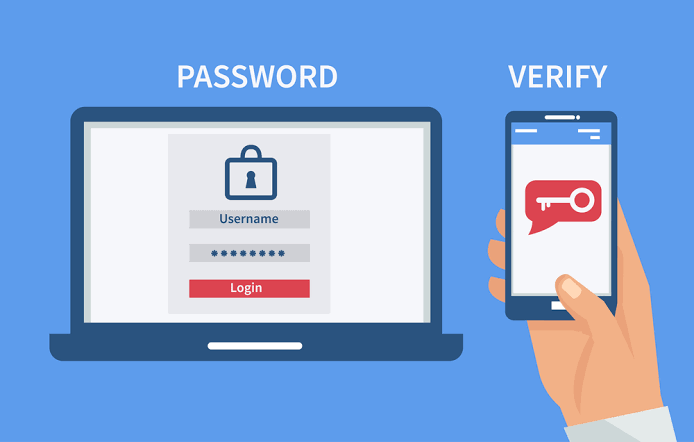
- Enable two-factor authentication on important accounts.
- Repeat searches periodically to check for newly published information.
You do not need to complete every step in one day. Start with the most sensitive information, particularly your home address, personal phone number, and accounts that could expose other personal data.
Frequently Asked Questions
Can I remove my name from Google?
You can request removal of certain search results containing your personal information, depending on Google’s policies and the circumstances. However, removing a result from Google does not automatically delete the original webpage.
How do I remove my home address from the internet?
Search for your address to identify the websites publishing it. Submit removal or opt-out requests to those websites, check data broker databases, and use eligible search engine removal tools. The process may need to be repeated if your information reappears.
How can I remove my phone number from people-search websites?
Find your profile on each relevant website and look for its privacy, opt-out, or removal procedure. Follow the verification instructions and save confirmation of your request. Different websites may require separate requests.
Is it free to remove personal information from the internet?
Many removal requests can be submitted for free directly to websites and search engines. Commercial privacy services may charge fees to automate the process or monitor for future exposure.
Can I remove information from data broker websites permanently?
You may be able to opt out of individual services, but permanent removal is not guaranteed. Some brokers may collect your information again from public records or other sources, so periodic checks can be useful.
How do I remove old accounts from websites?
Sign in to each account, download anything you want to keep, and use the service’s account deletion process. If you cannot access the account, contact the provider’s official support team.
Can I remove photographs of myself posted by someone else?
You can ask the person who posted the photograph or the website hosting it to remove it. You may also report the content if it violates platform rules or applicable law. Removal is not guaranteed for every lawful photograph.
Does deleting my social media account remove everything?
Not necessarily. Deleting an account may remove or hide much of its content, but copies, screenshots, messages sent to other people, or information retained by the platform may remain. Review the service’s deletion policy before proceeding.
Can a VPN remove my personal information from the internet?
No. A VPN can help protect certain aspects of your internet connection and conceal your IP address from some websites, but it does not remove your name, address, or other details already published online.
How often should I check my online privacy?
Consider reviewing your public information every few months and after major changes, such as moving, changing phone numbers, or closing important accounts. If you have experienced identity theft, harassment, or unwanted exposure, more frequent checks may be appropriate.
Final Thoughts
Removing your personal information from the internet takes time, but it is a practical way to improve your privacy and reduce unnecessary exposure.
Start by searching for your name, phone number, email address, and home address. Identify the websites displaying your information, contact the original publishers, submit eligible search engine removal requests, and opt out of data broker services where possible.
Next, review your social media profiles, delete unused accounts, and limit the personal details you share publicly. Strengthen the security of your email and other important accounts so that reducing public exposure is supported by better account protection.
Remember that no single tool can erase every trace of your information. Some records may need to remain public, and copies may persist even after a website removes its original page.
The bottom line: You may not be able to remove every piece of personal information from the internet, but you can significantly reduce what strangers can find. Start with your most sensitive details, use official removal procedures, and make privacy checks a regular habit to maintain better control over your digital footprint.