The internet has become an important part of everyday life. People use it to communicate with friends and family, shop online, manage bank accounts, work remotely, study, watch videos, and store personal information. While the internet makes life easier and more convenient, it also comes with certain risks. Cybercriminals are constantly looking for ways to steal information, access accounts, spread malware, or trick people into giving away sensitive data.
This is where Internet Security becomes important. Internet security refers to the practices, technologies, and precautions used to protect computers, smartphones, networks, accounts, and personal information from online threats. Good internet security is not only important for businesses and large organizations. It is equally important for ordinary internet users.
What Is Internet Security?
Internet security is the process of protecting digital devices, online accounts, networks, and personal information from unauthorized access and cyber threats. It includes a combination of security tools and safe online habits.
For example, using strong passwords, enabling two-factor authentication, keeping software updated, avoiding suspicious links, and using trusted security software are all part of good internet security.
The main purpose is simple: to reduce the chances of someone gaining unauthorized access to your information or damaging your devices.
Internet security covers many areas, including online privacy, account protection, secure browsing, data protection, and network security. Because cyber threats are constantly changing, internet users need to stay aware of common risks and learn how to protect themselves.
Why Is Internet Security Important?
Almost every person leaves some form of digital information online. This may include names, phone numbers, email addresses, photographs, financial information, passwords, and private conversations.
If this information falls into the wrong hands, it can be used for identity theft, financial fraud, blackmail, account takeovers, or other harmful activities.
Strong internet security helps reduce these risks. It can protect your personal information and prevent criminals from easily accessing your accounts.
Internet security is also important because cyberattacks are not always obvious. A malicious program may operate quietly in the background, while a phishing email may look almost identical to a legitimate message from a bank or online service.
Being careful online gives you an additional layer of protection.
Common Internet Security Threats
There are many different types of online threats. Understanding them is one of the first steps toward staying safe.
1. Phishing
Phishing is one of the most common online scams. In a phishing attack, criminals send fake emails, text messages, or website links designed to look legitimate.
For example, you might receive a message claiming that your bank account has been locked and asking you to click a link to verify your information. The link may lead to a fake website designed to steal your username, password, or financial details.
Before clicking a link, always check who sent the message and whether the request makes sense.
2. Malware
Malware is a general term for malicious software created to damage devices, steal information, or gain unauthorized access.
Viruses, spyware, ransomware, and certain types of trojans are examples of malware. Malware can enter a device through unsafe downloads, suspicious email attachments, infected websites, or compromised software.
Keeping your operating system and security software updated can help protect your device from many known threats.
3. Weak Passwords
A weak password can make it much easier for criminals to access an account. Passwords such as “123456,” “password,” or a person’s name are relatively easy to guess or crack.
It is better to use long, unique passwords for important accounts. You should also avoid using the same password everywhere. If one website experiences a data breach, criminals may try the stolen password on other websites.
A password manager can make it easier to create and remember strong, unique passwords.
4. Identity Theft
Identity theft happens when someone obtains and misuses another person’s personal information. Criminals may use stolen information to create accounts, make fraudulent purchases, access financial services, or impersonate the victim.
Sharing less personal information publicly and being careful about what you provide to websites can help reduce the risk.
5. Unsafe Public Wi-Fi
Public Wi-Fi networks can be convenient in airports, hotels, cafes, and other locations. However, not every public network is secure.
When using an unfamiliar network, avoid accessing highly sensitive accounts unless you know the connection is secure. A reputable VPN can provide additional protection by encrypting internet traffic, although it should not be considered a complete replacement for other security measures.
How to Improve Your Internet Security
Protecting yourself online does not have to be complicated. A few consistent habits can make a significant difference.
Use Strong and Unique Passwords
Create long passwords that are difficult to guess. Ideally, each important account should have its own password. This prevents one compromised account from putting your other accounts at risk.
A password manager can help you generate and store complex passwords securely.
Enable Two-Factor Authentication
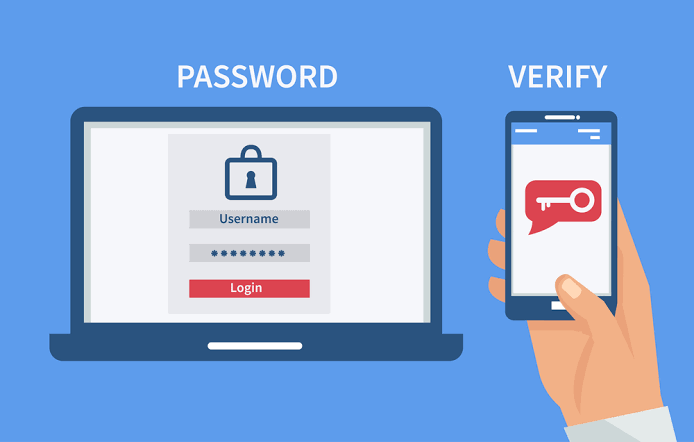
Two-factor authentication, often called 2FA, adds another security layer to your account.
Instead of relying only on a password, you may be asked to enter a verification code or approve a login through another device. Even if someone manages to obtain your password, they may still be unable to access your account without the second factor.
Whenever a trusted service offers 2FA, enabling it is generally a good idea.
Keep Software Updated
Software updates are not only about adding new features. They often include security fixes for vulnerabilities that attackers could exploit.
Keep your operating system, web browser, applications, and security software updated. Turning on automatic updates can make this easier.
Be Careful With Links and Attachments
Do not automatically trust every link or attachment you receive. Be especially cautious when a message creates a sense of urgency or asks for sensitive information.
Instead of clicking a link in a suspicious message, visit the company’s official website directly by typing its address into your browser or using a trusted bookmark.
Use Reliable Security Software
Antivirus and other security tools can help detect and block certain malicious programs. They are particularly useful when combined with safe browsing habits and regular software updates.
No security program can guarantee complete protection, but using reputable security software can reduce your exposure to many common threats.
Secure Your Home Wi-Fi
Your home router is another important part of internet security. Change the router’s default administrator password and use a strong Wi-Fi password.
Make sure the router uses modern security settings and keep its firmware updated when updates are available.
You should also avoid sharing your Wi-Fi password unnecessarily.
Internet Security for Businesses
Internet security is especially important for businesses because companies often manage large amounts of sensitive information.
A security incident can expose customer information, employee records, financial data, and confidential business documents. It can also damage a company’s reputation.
Businesses should use security policies, employee training, access controls, backups, encryption, firewalls, and monitoring systems where appropriate.
Employees should also be trained to recognize phishing attempts and other common threats. In many cases, human error can create opportunities for cybercriminals, so security awareness is an important part of an organization’s overall defense.
The Role of Privacy in Internet Security
Privacy and security are closely connected, but they are not exactly the same thing. Security focuses on protecting information and systems from unauthorized access, while privacy focuses on how personal information is collected, used, shared, and stored.
Users should understand what information websites and applications request and review privacy settings when necessary.
It is also wise to think carefully before posting personal details publicly. Information that seems harmless by itself can sometimes be combined with other information to create a more complete picture of a person.
What Should You Do If Your Account Is Hacked?
If you believe that one of your online accounts has been compromised, act quickly.
First, change the password from a trusted device. If you use the same password on other websites, change those passwords as well. Enable two-factor authentication if it is available.
Check the account for unfamiliar activity, such as unknown logins, messages, purchases, or changes to recovery information. If financial information may have been exposed, contact your bank or relevant financial institution.
You should also be cautious about messages sent from the compromised account, because attackers may use it to target your contacts.
Frequently Asked Questions
1. What is Internet Security?
Internet security is the practice of protecting devices, online accounts, networks, and personal information from cyber threats such as malware, phishing, hacking, and unauthorized access.
2. Why is Internet Security important?
Internet security is important because people store and share a large amount of personal and financial information online. Good security practices can help prevent data theft, account hacking, identity theft, and other cyber threats.
3. How can I improve my Internet Security?
You can improve your internet security by using strong and unique passwords, enabling two-factor authentication, keeping software updated, avoiding suspicious links, securing your Wi-Fi network, and using reliable security software.
4. Is public Wi-Fi safe?
Public Wi-Fi can carry security risks, especially when the network is unsecured or unfamiliar. Avoid entering sensitive information on questionable networks and use additional security measures when necessary.
5. Can Internet Security completely prevent cyberattacks?
No security method can guarantee complete protection from every cyberattack. However, using strong security practices and staying alert can significantly reduce your chances of becoming a victim of common online threats.
Final Thoughts
Internet security is not something that should only concern technology experts. Anyone who uses a smartphone, computer, social media account, email, or online banking service can become a target of cybercrime.
The good news is that many security risks can be reduced through simple habits. Use strong and unique passwords, enable two-factor authentication, keep your software updated, avoid suspicious links, secure your Wi-Fi network, and think carefully before sharing personal information online.
No single tool can provide perfect protection. Internet security works best when technology and responsible online behavior are used together. By staying informed and developing safer digital habits, you can enjoy the benefits of the internet while reducing the risks that come with being connected.